WordPress database error: [UPDATE command denied to user 'u624706991_xHKYb'@'127.0.0.1' for table `u624706991_xdrr8`.`wpa8_options`] UPDATE `wpa8_options` SET `option_value` = '0' WHERE `option_name` = 'is_wordpress_com_hosted'
WordPress database error: [INSERT, UPDATE command denied to user 'u624706991_xHKYb'@'127.0.0.1' for table `u624706991_xdrr8`.`wpa8_options`] INSERT INTO `wpa8_options` (`option_name`, `option_value`, `autoload`) VALUES ('_transient_timeout_facebook_wpcom_check', '1795563006', 'off') ON DUPLICATE KEY UPDATE `option_name` = VALUES(`option_name`), `option_value` = VALUES(`option_value`), `autoload` = VALUES(`autoload`)
WordPress database error: [INSERT, UPDATE command denied to user 'u624706991_xHKYb'@'127.0.0.1' for table `u624706991_xdrr8`.`wpa8_options`] INSERT INTO `wpa8_options` (`option_name`, `option_value`, `autoload`) VALUES ('_transient_facebook_wpcom_check', '1', 'off') ON DUPLICATE KEY UPDATE `option_name` = VALUES(`option_name`), `option_value` = VALUES(`option_value`), `autoload` = VALUES(`autoload`)
WordPress database error: [UPDATE command denied to user 'u624706991_xHKYb'@'127.0.0.1' for table `u624706991_xdrr8`.`wpa8_options`] UPDATE `wpa8_options` SET `option_value` = 'a:17:{s:11:\"plugin_data\";a:1:{s:10:\"wpr-addons\";a:18:{s:16:\"plugin_main_file\";O:8:\"stdClass\":1:{s:4:\"path\";s:37:\"royal-elementor-addons/wpr-addons.php\";}s:20:\"is_network_activated\";b:0;s:17:\"install_timestamp\";i:1707335881;s:17:\"was_plugin_loaded\";b:1;s:21:\"is_plugin_new_install\";b:0;s:16:\"sdk_last_version\";s:6:\"2.5.12\";s:11:\"sdk_version\";s:6:\"2.12.0\";s:16:\"sdk_upgrade_mode\";b:1;s:18:\"sdk_downgrade_mode\";b:0;s:19:\"plugin_last_version\";s:8:\"1.7.1066\";s:14:\"plugin_version\";s:8:\"1.7.1067\";s:19:\"plugin_upgrade_mode\";b:1;s:21:\"plugin_downgrade_mode\";b:0;s:17:\"connectivity_test\";a:6:{s:12:\"is_connected\";N;s:4:\"host\";s:16:\"www.seoqueen.com\";s:9:\"server_ip\";s:14:\"35.209.181.203\";s:9:\"is_active\";b:1;s:9:\"timestamp\";i:1707335881;s:7:\"version\";s:6:\"1.3.88\";}s:15:\"prev_is_premium\";b:0;s:12:\"is_anonymous\";a:3:{s:2:\"is\";b:1;s:9:\"timestamp\";i:1707335903;s:7:\"version\";s:6:\"1.3.88\";}s:30:\"affiliate_program_notice_shown\";i:1709943301;s:19:\"last_load_timestamp\";i:1794958206;}}s:13:\"file_slug_map\";a:1:{s:37:\"royal-elementor-addons/wpr-addons.php\";s:10:\"wpr-addons\";}s:7:\"plugins\";a:1:{s:10:\"wpr-addons\";O:9:\"FS_Plugin\":24:{s:2:\"id\";s:4:\"8416\";s:7:\"updated\";N;s:7:\"created\";N;s:22:\"\0FS_Entity\0_is_updated\";b:0;s:10:\"public_key\";s:32:\"pk_a0b21b234a7c9581a555b9ee9f28a\";s:10:\"secret_key\";N;s:16:\"parent_plugin_id\";N;s:5:\"title\";s:22:\"Royal Elementor Addons\";s:4:\"slug\";s:10:\"wpr-addons\";s:12:\"premium_slug\";s:14:\"wpr-addons-pro\";s:4:\"type\";s:6:\"plugin\";s:20:\"affiliate_moderation\";s:8:\"selected\";s:19:\"is_wp_org_compliant\";b:1;s:22:\"premium_releases_count\";N;s:4:\"file\";s:37:\"royal-elementor-addons/wpr-addons.php\";s:7:\"version\";s:8:\"1.7.1067\";s:11:\"auto_update\";N;s:4:\"info\";N;s:10:\"is_premium\";b:0;s:14:\"premium_suffix\";s:9:\"(Premium)\";s:7:\"is_live\";b:1;s:9:\"bundle_id\";N;s:17:\"bundle_public_key\";N;s:17:\"opt_in_moderation\";N;}}s:9:\"unique_id\";s:32:\"2c389bcfb7baa5707acdcc65b9b8dc58\";s:5:\"plans\";a:0:{}s:5:\"sites\";a:0:{}s:11:\"all_plugins\";O:8:\"stdClass\":3:{s:9:\"timestamp\";i:1527215706;s:3:\"md5\";s:32:\"bd9d3401b6cc3a3d2d548553812aa60f\";s:7:\"plugins\";a:23:{s:57:\"acuity-online-appointment-scheduling/acuityscheduling.php\";a:5:{s:4:\"slug\";s:36:\"acuity-online-appointment-scheduling\";s:7:\"version\";s:5:\"1.1.0\";s:5:\"title\";s:36:\"Acuity Online Appointment Scheduling\";s:9:\"is_active\";b:1;s:14:\"is_uninstalled\";b:0;}s:19:\"akismet/akismet.php\";a:6:{s:4:\"slug\";s:7:\"akismet\";s:7:\"version\";s:5:\"4.0.1\";s:5:\"title\";s:17:\"Akismet Anti-Spam\";s:9:\"is_active\";b:1;s:14:\"is_uninstalled\";b:0;s:7:\"Version\";s:5:\"4.0.3\";}s:24:\"bb-plugin/fl-builder.php\";a:5:{s:4:\"slug\";s:9:\"bb-plugin\";s:7:\"version\";s:8:\"1.10.9.2\";s:5:\"title\";s:40:\"Beaver Builder Plugin (Standard Version)\";s:9:\"is_active\";b:1;s:14:\"is_uninstalled\";b:0;}s:36:\"contact-form-7/wp-contact-form-7.php\";a:6:{s:4:\"slug\";s:14:\"contact-form-7\";s:7:\"version\";s:5:\"4.9.1\";s:5:\"title\";s:14:\"Contact Form 7\";s:9:\"is_active\";b:1;s:14:\"is_uninstalled\";b:0;s:7:\"Version\";s:5:\"5.0.2\";}s:41:\"css-javascript-toolbox/css-js-toolbox.php\";a:5:{s:4:\"slug\";s:22:\"css-javascript-toolbox\";s:7:\"version\";s:5:\"8.3.2\";s:5:\"title\";s:24:\"CSS & JavaScript Toolbox\";s:9:\"is_active\";b:1;s:14:\"is_uninstalled\";b:0;}s:47:\"fullwidth-templates/fullwidth-page-template.php\";a:5:{s:4:\"slug\";s:19:\"fullwidth-templates\";s:7:\"version\";s:5:\"1.0.2\";s:5:\"title\";s:24:\"Fullwidth Page Templates\";s:9:\"is_active\";b:1;s:14:\"is_uninstalled\";b:0;}s:19:\"jetpack/jetpack.php\";a:6:{s:4:\"slug\";s:7:\"jetpack\";s:7:\"version\";s:3:\"5.5\";s:5:\"title\";s:24:\"Jetpack by WordPress.com\";s:9:\"is_active\";b:1;s:14:\"is_uninstalled\";b:0;s:7:\"Version\";s:5:\"6.1.1\";}s:27:\"js_composer/js_composer.php\";a:5:{s:4:\"slug\";s:11:\"js_composer\";s:7:\"version\";s:5:\"5.4.2\";s:5:\"title\";s:24:\"WPBakery Visual Composer\";s:9:\"is_active\";b:1;s:14:\"is_uninstalled\";b:0;}s:27:\"popup-maker/popup-maker.php\";a:6:{s:4:\"slug\";s:11:\"popup-maker\";s:7:\"version\";s:5:\"1.6.6\";s:5:\"title\";s:11:\"Popup Maker\";s:9:\"is_active\";b:1;s:14:\"is_uninstalled\";b:0;s:7:\"Version\";s:6:\"1.7.21\";}s:47:\"thrive-clever-widgets/thrive-clever-widgets.php\";a:6:{s:4:\"slug\";s:21:\"thrive-clever-widgets\";s:7:\"version\";s:4:\"1.29\";s:5:\"title\";s:21:\"Thrive Clever Widgets\";s:9:\"is_active\";b:1;s:14:\"is_uninstalled\";b:0;s:7:\"Version\";s:4:\"1.32\";}s:55:\"thrive-headline-optimizer/thrive-headline-optimizer.php\";a:6:{s:4:\"slug\";s:25:\"thrive-headline-optimizer\";s:7:\"version\";s:5:\"1.1.7\";s:5:\"title\";s:25:\"Thrive Headline Optimizer\";s:9:\"is_active\";b:1;s:14:\"is_uninstalled\";b:0;s:7:\"Version\";s:6:\"1.1.14\";}s:29:\"thrive-leads/thrive-leads.php\";a:6:{s:4:\"slug\";s:12:\"thrive-leads\";s:7:\"version\";s:6:\"2.0.14\";s:5:\"title\";s:12:\"Thrive Leads\";s:9:\"is_active\";b:1;s:14:\"is_uninstalled\";b:0;s:7:\"Version\";s:6:\"2.0.34\";}s:33:\"thrive-ovation/thrive-ovation.php\";a:6:{s:4:\"slug\";s:14:\"thrive-ovation\";s:7:\"version\";s:5:\"2.0.4\";s:5:\"title\";s:14:\"Thrive Ovation\";s:9:\"is_active\";b:1;s:14:\"is_uninstalled\";b:0;s:7:\"Version\";s:6:\"2.0.13\";}s:37:\"thrive-ultimatum/thrive-ultimatum.php\";a:6:{s:4:\"slug\";s:16:\"thrive-ultimatum\";s:7:\"version\";s:6:\"2.0.13\";s:5:\"title\";s:16:\"Thrive Ultimatum\";s:9:\"is_active\";b:1;s:14:\"is_uninstalled\";b:0;s:7:\"Version\";s:6:\"2.0.33\";}s:45:\"thrive-visual-editor/thrive-visual-editor.php\";a:6:{s:4:\"slug\";s:20:\"thrive-visual-editor\";s:7:\"version\";s:6:\"2.0.13\";s:5:\"title\";s:20:\"Thrive Visual Editor\";s:9:\"is_active\";b:1;s:14:\"is_uninstalled\";b:0;s:7:\"Version\";s:6:\"2.0.33\";}s:27:\"woocommerce/woocommerce.php\";a:6:{s:4:\"slug\";s:11:\"woocommerce\";s:7:\"version\";s:5:\"3.2.3\";s:5:\"title\";s:11:\"WooCommerce\";s:9:\"is_active\";b:0;s:14:\"is_uninstalled\";b:0;s:7:\"Version\";s:5:\"3.4.0\";}s:24:\"wordpress-seo/wp-seo.php\";a:5:{s:4:\"slug\";s:13:\"wordpress-seo\";s:7:\"version\";s:5:\"6.3.1\";s:5:\"title\";s:9:\"Yoast SEO\";s:9:\"is_active\";b:1;s:14:\"is_uninstalled\";b:0;}s:47:\"wp-security-audit-log/wp-security-audit-log.php\";a:6:{s:4:\"slug\";s:21:\"wp-security-audit-log\";s:7:\"version\";s:7:\"2.6.9.1\";s:5:\"title\";s:21:\"WP Security Audit Log\";s:9:\"is_active\";b:1;s:14:\"is_uninstalled\";b:0;s:7:\"Version\";s:5:\"3.1.7\";}s:17:\"leadin/leadin.php\";a:6:{s:4:\"slug\";s:6:\"leadin\";s:7:\"version\";s:5:\"6.1.4\";s:5:\"title\";s:40:\"HubSpot Marketing Free (formerly Leadin)\";s:9:\"is_active\";b:1;s:14:\"is_uninstalled\";b:0;s:7:\"Version\";s:5:\"6.1.5\";}s:23:\"queue-linker/plugin.php\";a:5:{s:4:\"slug\";s:12:\"queue-linker\";s:7:\"version\";s:3:\"1.0\";s:5:\"title\";s:5:\"Queue\";s:9:\"is_active\";b:1;s:14:\"is_uninstalled\";b:0;}s:58:\"podamibe-custom-user-gravatar/pod-custom-user-gravatar.php\";a:6:{s:4:\"slug\";s:29:\"podamibe-custom-user-gravatar\";s:7:\"version\";s:5:\"1.0.4\";s:5:\"title\";s:29:\"Podamibe Custom User Gravatar\";s:9:\"is_active\";b:1;s:14:\"is_uninstalled\";b:0;s:7:\"Version\";s:5:\"1.0.5\";}s:45:\"wp-live-chat-support/wp-live-chat-support.php\";a:6:{s:4:\"slug\";s:20:\"wp-live-chat-support\";s:7:\"version\";s:6:\"7.1.07\";s:5:\"title\";s:20:\"WP Live Chat Support\";s:9:\"is_active\";b:1;s:14:\"is_uninstalled\";b:0;s:7:\"Version\";s:6:\"8.0.08\";}s:21:\"flamingo/flamingo.php\";a:5:{s:4:\"slug\";s:8:\"flamingo\";s:7:\"version\";s:3:\"1.8\";s:5:\"title\";s:8:\"Flamingo\";s:9:\"is_active\";b:0;s:14:\"is_uninstalled\";b:0;}}}s:10:\"all_themes\";O:8:\"stdClass\":3:{s:9:\"timestamp\";i:1540953820;s:3:\"md5\";s:32:\"3b6b8ea7e73d278521a25738ee394a74\";s:6:\"themes\";a:2:{s:4:\"luxe\";a:5:{s:4:\"slug\";s:4:\"luxe\";s:7:\"version\";s:8:\"1.300.07\";s:5:\"title\";s:4:\"Luxe\";s:9:\"is_active\";b:1;s:14:\"is_uninstalled\";b:0;}s:7:\"salient\";a:5:{s:4:\"slug\";s:7:\"salient\";s:7:\"version\";s:5:\"6.1.5\";s:5:\"title\";s:7:\"Salient\";s:9:\"is_active\";b:0;s:14:\"is_uninstalled\";b:0;}}}s:5:\"users\";a:0:{}s:8:\"licenses\";a:1:{s:11:\"popup-maker\";a:1:{i:440117;b:0;}}s:21:\"id_slug_type_path_map\";a:1:{i:8416;a:3:{s:4:\"slug\";s:10:\"wpr-addons\";s:4:\"type\";s:6:\"plugin\";s:4:\"path\";s:37:\"royal-elementor-addons/wpr-addons.php\";}}s:23:\"user_id_license_ids_map\";a:0:{}s:12:\"all_licenses\";a:0:{}s:14:\"active_plugins\";O:8:\"stdClass\":3:{s:9:\"timestamp\";i:1540953820;s:3:\"md5\";s:32:\"180f6ba5c9e28ac315494fc7bb63274c\";s:7:\"plugins\";a:22:{s:57:\"acuity-online-appointment-scheduling/acuityscheduling.php\";a:13:{s:4:\"Name\";s:36:\"Acuity Online Appointment Scheduling\";s:9:\"PluginURI\";s:27:\"http://AcuityScheduling.com\";s:7:\"Version\";s:5:\"1.1.0\";s:11:\"Description\";s:192:\"Embed <a href=\"https://acuityscheduling.com\">Acuity Online Appointment Scheduling</a> into your site. The tag to embed is: <code>[scheduling site=\"https://mysite.acuityscheduling.com\"]</code>\";s:6:\"Author\";s:17:\"Acuity Scheduling\";s:9:\"AuthorURI\";s:27:\"http://AcuityScheduling.com\";s:10:\"TextDomain\";s:36:\"acuity-online-appointment-scheduling\";s:10:\"DomainPath\";s:0:\"\";s:7:\"Network\";b:0;s:5:\"Title\";s:36:\"Acuity Online Appointment Scheduling\";s:10:\"AuthorName\";s:17:\"Acuity Scheduling\";s:9:\"is_active\";b:1;s:4:\"slug\";s:36:\"acuity-online-appointment-scheduling\";}s:19:\"akismet/akismet.php\";a:13:{s:4:\"Name\";s:17:\"Akismet Anti-Spam\";s:9:\"PluginURI\";s:20:\"https://akismet.com/\";s:7:\"Version\";s:5:\"4.0.3\";s:11:\"Description\";s:279:\"Used by millions, Akismet is quite possibly the best way in the world to <strong>protect your blog from spam</strong>. It keeps your site protected even while you sleep. To get started: activate the Akismet plugin and then go to your Akismet Settings page to set up your API key.\";s:6:\"Author\";s:10:\"Automattic\";s:9:\"AuthorURI\";s:41:\"https://automattic.com/wordpress-plugins/\";s:10:\"TextDomain\";s:7:\"akismet\";s:10:\"DomainPath\";s:0:\"\";s:7:\"Network\";b:0;s:5:\"Title\";s:17:\"Akismet Anti-Spam\";s:10:\"AuthorName\";s:10:\"Automattic\";s:9:\"is_active\";b:1;s:4:\"slug\";s:7:\"akismet\";}s:24:\"bb-plugin/fl-builder.php\";a:13:{s:4:\"Name\";s:40:\"Beaver Builder Plugin (Standard Version)\";s:9:\"PluginURI\";s:107:\"https://www.wpbeaverbuilder.com/?utm_medium=bb&utm_source=plugins-admin-page&utm_campaign=plugins-admin-uri\";s:7:\"Version\";s:8:\"1.10.9.2\";s:11:\"Description\";s:88:\"A drag and drop frontend WordPress page builder plugin that works with almost any theme!\";s:6:\"Author\";s:23:\"The Beaver Builder Team\";s:9:\"AuthorURI\";s:110:\"https://www.wpbeaverbuilder.com/?utm_medium=bb&utm_source=plugins-admin-page&utm_campaign=plugins-admin-author\";s:10:\"TextDomain\";s:10:\"fl-builder\";s:10:\"DomainPath\";s:0:\"\";s:7:\"Network\";b:0;s:5:\"Title\";s:40:\"Beaver Builder Plugin (Standard Version)\";s:10:\"AuthorName\";s:23:\"The Beaver Builder Team\";s:9:\"is_active\";b:1;s:4:\"slug\";s:9:\"bb-plugin\";}s:36:\"contact-form-7/wp-contact-form-7.php\";a:13:{s:4:\"Name\";s:14:\"Contact Form 7\";s:9:\"PluginURI\";s:25:\"https://contactform7.com/\";s:7:\"Version\";s:5:\"5.0.2\";s:11:\"Description\";s:54:\"Just another contact form plugin. Simple but flexible.\";s:6:\"Author\";s:16:\"Takayuki Miyoshi\";s:9:\"AuthorURI\";s:31:\"https://ideasilo.wordpress.com/\";s:10:\"TextDomain\";s:14:\"contact-form-7\";s:10:\"DomainPath\";s:11:\"/languages/\";s:7:\"Network\";b:0;s:5:\"Title\";s:14:\"Contact Form 7\";s:10:\"AuthorName\";s:16:\"Takayuki Miyoshi\";s:9:\"is_active\";b:1;s:4:\"slug\";s:14:\"contact-form-7\";}s:41:\"css-javascript-toolbox/css-js-toolbox.php\";a:13:{s:4:\"Name\";s:24:\"CSS & JavaScript Toolbox\";s:9:\"PluginURI\";s:34:\"http://css-javascript-toolbox.com/\";s:7:\"Version\";s:5:\"8.3.2\";s:11:\"Description\";s:243:\"The CSS & JavaScript Toolbox plugin on WordPress.org is no longer supported. This has been replaced by our new code management plugin also on WordPress.org called <a href=\"https://wordpress.org/plugins/easy-code-manager\">Easy Code Manager</a>.\";s:6:\"Author\";s:13:\"Wipeout Media\";s:9:\"AuthorURI\";s:33:\"http://css-javascript-toolbox.com\";s:10:\"TextDomain\";s:22:\"css-javascript-toolbox\";s:10:\"DomainPath\";s:0:\"\";s:7:\"Network\";b:0;s:5:\"Title\";s:24:\"CSS & JavaScript Toolbox\";s:10:\"AuthorName\";s:13:\"Wipeout Media\";s:9:\"is_active\";b:1;s:4:\"slug\";s:22:\"css-javascript-toolbox\";}s:47:\"fullwidth-templates/fullwidth-page-template.php\";a:13:{s:4:\"Name\";s:24:\"Fullwidth Page Templates\";s:9:\"PluginURI\";s:31:\"https://www.brainstormforce.com\";s:7:\"Version\";s:5:\"1.0.2\";s:11:\"Description\";s:47:\"Create Full width landing pages with any theme.\";s:6:\"Author\";s:16:\"Brainstorm Force\";s:9:\"AuthorURI\";s:31:\"https://www.brainstormforce.com\";s:10:\"TextDomain\";s:23:\"fullwidth-page-template\";s:10:\"DomainPath\";s:10:\"/languages\";s:7:\"Network\";b:0;s:5:\"Title\";s:24:\"Fullwidth Page Templates\";s:10:\"AuthorName\";s:16:\"Brainstorm Force\";s:9:\"is_active\";b:1;s:4:\"slug\";s:19:\"fullwidth-templates\";}s:19:\"jetpack/jetpack.php\";a:13:{s:4:\"Name\";s:24:\"Jetpack by WordPress.com\";s:9:\"PluginURI\";s:19:\"https://jetpack.com\";s:7:\"Version\";s:5:\"6.1.1\";s:11:\"Description\";s:218:\"Bring the power of the WordPress.com cloud to your self-hosted WordPress. Jetpack enables you to connect your blog to a WordPress.com account to use the powerful features normally only available to WordPress.com users.\";s:6:\"Author\";s:10:\"Automattic\";s:9:\"AuthorURI\";s:19:\"https://jetpack.com\";s:10:\"TextDomain\";s:7:\"jetpack\";s:10:\"DomainPath\";s:11:\"/languages/\";s:7:\"Network\";b:0;s:5:\"Title\";s:24:\"Jetpack by WordPress.com\";s:10:\"AuthorName\";s:10:\"Automattic\";s:9:\"is_active\";b:1;s:4:\"slug\";s:7:\"jetpack\";}s:27:\"js_composer/js_composer.php\";a:13:{s:4:\"Name\";s:21:\"WPBakery Page Builder\";s:9:\"PluginURI\";s:22:\"http://vc.wpbakery.com\";s:7:\"Version\";s:5:\"5.4.2\";s:11:\"Description\";s:157:\"Drag and drop page builder for WordPress. Take full control over your WordPress site, build any layout you can imagine – no programming knowledge required.\";s:6:\"Author\";s:24:\"Michael M - WPBakery.com\";s:9:\"AuthorURI\";s:19:\"http://wpbakery.com\";s:10:\"TextDomain\";s:11:\"js_composer\";s:10:\"DomainPath\";s:0:\"\";s:7:\"Network\";b:0;s:5:\"Title\";s:21:\"WPBakery Page Builder\";s:10:\"AuthorName\";s:24:\"Michael M - WPBakery.com\";s:9:\"is_active\";b:1;s:4:\"slug\";s:11:\"js_composer\";}s:27:\"popup-maker/popup-maker.php\";a:13:{s:4:\"Name\";s:11:\"Popup Maker\";s:9:\"PluginURI\";s:96:\"https://wppopupmaker.com/?utm_campaign=PluginInfo&utm_source=plugin-header&utm_medium=plugin-uri\";s:7:\"Version\";s:6:\"1.7.21\";s:11:\"Description\";s:135:\"Easily create & style popups with any content. Theme editor to quickly style your popups. Add forms, social media boxes, videos & more.\";s:6:\"Author\";s:14:\"WP Popup Maker\";s:9:\"AuthorURI\";s:96:\"https://wppopupmaker.com/?utm_campaign=PluginInfo&utm_source=plugin-header&utm_medium=author-uri\";s:10:\"TextDomain\";s:11:\"popup-maker\";s:10:\"DomainPath\";s:0:\"\";s:7:\"Network\";b:0;s:5:\"Title\";s:11:\"Popup Maker\";s:10:\"AuthorName\";s:14:\"WP Popup Maker\";s:9:\"is_active\";b:1;s:4:\"slug\";s:11:\"popup-maker\";}s:47:\"thrive-clever-widgets/thrive-clever-widgets.php\";a:13:{s:4:\"Name\";s:21:\"Thrive Clever Widgets\";s:9:\"PluginURI\";s:24:\"https://thrivethemes.com\";s:7:\"Version\";s:4:\"1.32\";s:11:\"Description\";s:71:\"Take control over exactly where your widgets are displayed on your site\";s:6:\"Author\";s:52:\"<a href=\"https://thrivethemes.com\">Thrive Themes</a>\";s:9:\"AuthorURI\";s:0:\"\";s:10:\"TextDomain\";s:21:\"thrive-clever-widgets\";s:10:\"DomainPath\";s:0:\"\";s:7:\"Network\";b:0;s:5:\"Title\";s:21:\"Thrive Clever Widgets\";s:10:\"AuthorName\";s:52:\"<a href=\"https://thrivethemes.com\">Thrive Themes</a>\";s:9:\"is_active\";b:1;s:4:\"slug\";s:21:\"thrive-clever-widgets\";}s:55:\"thrive-headline-optimizer/thrive-headline-optimizer.php\";a:13:{s:4:\"Name\";s:25:\"Thrive Headline Optimizer\";s:9:\"PluginURI\";s:24:\"https://thrivethemes.com\";s:7:\"Version\";s:6:\"1.1.14\";s:11:\"Description\";s:61:\"Generate reports to find out how well your site is performing\";s:6:\"Author\";s:52:\"<a href=\"https://thrivethemes.com\">Thrive Themes</a>\";s:9:\"AuthorURI\";s:24:\"https://thrivethemes.com\";s:10:\"TextDomain\";s:15:\"thrive-headline\";s:10:\"DomainPath\";s:11:\"/languages/\";s:7:\"Network\";b:0;s:5:\"Title\";s:25:\"Thrive Headline Optimizer\";s:10:\"AuthorName\";s:52:\"<a href=\"https://thrivethemes.com\">Thrive Themes</a>\";s:9:\"is_active\";b:1;s:4:\"slug\";s:25:\"thrive-headline-optimizer\";}s:29:\"thrive-leads/thrive-leads.php\";a:13:{s:4:\"Name\";s:12:\"Thrive Leads\";s:9:\"PluginURI\";s:24:\"https://thrivethemes.com\";s:7:\"Version\";s:6:\"2.0.34\";s:11:\"Description\";s:48:\"The ultimate lead capture solution for Wordpress\";s:6:\"Author\";s:52:\"<a href=\"https://thrivethemes.com\">Thrive Themes</a>\";s:9:\"AuthorURI\";s:0:\"\";s:10:\"TextDomain\";s:12:\"thrive-leads\";s:10:\"DomainPath\";s:0:\"\";s:7:\"Network\";b:0;s:5:\"Title\";s:12:\"Thrive Leads\";s:10:\"AuthorName\";s:52:\"<a href=\"https://thrivethemes.com\">Thrive Themes</a>\";s:9:\"is_active\";b:1;s:4:\"slug\";s:12:\"thrive-leads\";}s:33:\"thrive-ovation/thrive-ovation.php\";a:13:{s:4:\"Name\";s:14:\"Thrive Ovation\";s:9:\"PluginURI\";s:24:\"https://thrivethemes.com\";s:7:\"Version\";s:6:\"2.0.13\";s:11:\"Description\";s:61:\"Collect, manage and display conversion boosting testimonials.\";s:6:\"Author\";s:52:\"<a href=\"https://thrivethemes.com\">Thrive Themes</a>\";s:9:\"AuthorURI\";s:24:\"https://thrivethemes.com\";s:10:\"TextDomain\";s:14:\"thrive-ovation\";s:10:\"DomainPath\";s:11:\"/languages/\";s:7:\"Network\";b:0;s:5:\"Title\";s:14:\"Thrive Ovation\";s:10:\"AuthorName\";s:52:\"<a href=\"https://thrivethemes.com\">Thrive Themes</a>\";s:9:\"is_active\";b:1;s:4:\"slug\";s:14:\"thrive-ovation\";}s:37:\"thrive-ultimatum/thrive-ultimatum.php\";a:13:{s:4:\"Name\";s:16:\"Thrive Ultimatum\";s:9:\"PluginURI\";s:24:\"https://thrivethemes.com\";s:7:\"Version\";s:6:\"2.0.33\";s:11:\"Description\";s:42:\"The ultimate scarcity plugin for Wordpress\";s:6:\"Author\";s:52:\"<a href=\"https://thrivethemes.com\">Thrive Themes</a>\";s:9:\"AuthorURI\";s:0:\"\";s:10:\"TextDomain\";s:10:\"thrive-ult\";s:10:\"DomainPath\";s:0:\"\";s:7:\"Network\";b:0;s:5:\"Title\";s:16:\"Thrive Ultimatum\";s:10:\"AuthorName\";s:52:\"<a href=\"https://thrivethemes.com\">Thrive Themes</a>\";s:9:\"is_active\";b:1;s:4:\"slug\";s:16:\"thrive-ultimatum\";}s:45:\"thrive-visual-editor/thrive-visual-editor.php\";a:13:{s:4:\"Name\";s:16:\"Thrive Architect\";s:9:\"PluginURI\";s:27:\"http://www.thrivethemes.com\";s:7:\"Version\";s:6:\"2.0.33\";s:11:\"Description\";s:48:\"Live front end editor for your Wordpress content\";s:6:\"Author\";s:55:\"<a href=\"http://www.thrivethemes.com\">Thrive Themes</a>\";s:9:\"AuthorURI\";s:0:\"\";s:10:\"TextDomain\";s:20:\"thrive-visual-editor\";s:10:\"DomainPath\";s:0:\"\";s:7:\"Network\";b:0;s:5:\"Title\";s:16:\"Thrive Architect\";s:10:\"AuthorName\";s:55:\"<a href=\"http://www.thrivethemes.com\">Thrive Themes</a>\";s:9:\"is_active\";b:1;s:4:\"slug\";s:20:\"thrive-visual-editor\";}s:24:\"wordpress-seo/wp-seo.php\";a:13:{s:4:\"Name\";s:9:\"Yoast SEO\";s:9:\"PluginURI\";s:18:\"https://yoa.st/1uj\";s:7:\"Version\";s:5:\"6.3.1\";s:11:\"Description\";s:117:\"The first true all-in-one SEO solution for WordPress, including on-page content analysis, XML sitemaps and much more.\";s:6:\"Author\";s:10:\"Team Yoast\";s:9:\"AuthorURI\";s:18:\"https://yoa.st/1uk\";s:10:\"TextDomain\";s:13:\"wordpress-seo\";s:10:\"DomainPath\";s:11:\"/languages/\";s:7:\"Network\";b:0;s:5:\"Title\";s:9:\"Yoast SEO\";s:10:\"AuthorName\";s:10:\"Team Yoast\";s:9:\"is_active\";b:1;s:4:\"slug\";s:13:\"wordpress-seo\";}s:47:\"wp-security-audit-log/wp-security-audit-log.php\";a:13:{s:4:\"Name\";s:21:\"WP Security Audit Log\";s:9:\"PluginURI\";s:34:\"http://www.wpsecurityauditlog.com/\";s:7:\"Version\";s:5:\"3.1.7\";s:11:\"Description\";s:395:\"Identify WordPress security issues before they become a problem. Keep track of everything happening on your WordPress including WordPress users activity. Similar to Windows Event Log and Linux Syslog, WP Security Audit Log generates a security alert for everything that happens on your WordPress blogs and websites. Use the Audit Log Viewer included in the plugin to see all the security alerts.\";s:6:\"Author\";s:17:\"WP White Security\";s:9:\"AuthorURI\";s:34:\"http://www.wpsecurityauditlog.com/\";s:10:\"TextDomain\";s:21:\"wp-security-audit-log\";s:10:\"DomainPath\";s:0:\"\";s:7:\"Network\";b:0;s:5:\"Title\";s:21:\"WP Security Audit Log\";s:10:\"AuthorName\";s:17:\"WP White Security\";s:9:\"is_active\";b:1;s:4:\"slug\";s:21:\"wp-security-audit-log\";}s:17:\"leadin/leadin.php\";a:13:{s:4:\"Name\";s:45:\"HubSpot - Free Marketing Plugin for WordPress\";s:9:\"PluginURI\";s:46:\"http://www.hubspot.com/products/marketing/free\";s:7:\"Version\";s:5:\"6.1.5\";s:11:\"Description\";s:172:\"HubSpot Marketing Free is the ultimate marketing plugin for WordPress for building an email list, generating and tracking leads, and tracking user behavior on your website.\";s:6:\"Author\";s:7:\"HubSpot\";s:9:\"AuthorURI\";s:22:\"http://www.hubspot.com\";s:10:\"TextDomain\";s:6:\"leadin\";s:10:\"DomainPath\";s:0:\"\";s:7:\"Network\";b:0;s:5:\"Title\";s:45:\"HubSpot - Free Marketing Plugin for WordPress\";s:10:\"AuthorName\";s:7:\"HubSpot\";s:9:\"is_active\";b:1;s:4:\"slug\";s:6:\"leadin\";}s:23:\"queue-linker/plugin.php\";a:13:{s:4:\"Name\";s:5:\"Queue\";s:9:\"PluginURI\";s:19:\"https://queueat.com\";s:7:\"Version\";s:3:\"1.0\";s:11:\"Description\";s:44:\"Queue: Viral Campaigns and Social Promotions\";s:6:\"Author\";s:18:\"Queue Technologies\";s:9:\"AuthorURI\";s:19:\"https://queueat.com\";s:10:\"TextDomain\";s:12:\"queue-linker\";s:10:\"DomainPath\";s:0:\"\";s:7:\"Network\";b:0;s:5:\"Title\";s:5:\"Queue\";s:10:\"AuthorName\";s:18:\"Queue Technologies\";s:9:\"is_active\";b:1;s:4:\"slug\";s:12:\"queue-linker\";}s:58:\"podamibe-custom-user-gravatar/pod-custom-user-gravatar.php\";a:13:{s:4:\"Name\";s:29:\"Podamibe Custom User Gravatar\";s:9:\"PluginURI\";s:43:\"http://podamibenepal.com/wordpress-plugins/\";s:7:\"Version\";s:5:\"1.0.5\";s:11:\"Description\";s:62:\"Allows users to use pictures in the media gallery as gravatar.\";s:6:\"Author\";s:14:\"Podamibe Nepal\";s:9:\"AuthorURI\";s:25:\"http://podamibenepal.com/\";s:10:\"TextDomain\";s:3:\"pcg\";s:10:\"DomainPath\";s:0:\"\";s:7:\"Network\";b:0;s:5:\"Title\";s:29:\"Podamibe Custom User Gravatar\";s:10:\"AuthorName\";s:14:\"Podamibe Nepal\";s:9:\"is_active\";b:1;s:4:\"slug\";s:29:\"podamibe-custom-user-gravatar\";}s:45:\"wp-live-chat-support/wp-live-chat-support.php\";a:13:{s:4:\"Name\";s:20:\"WP Live Chat Support\";s:9:\"PluginURI\";s:26:\"http://www.wp-livechat.com\";s:7:\"Version\";s:6:\"8.0.08\";s:11:\"Description\";s:175:\"The easiest to use website live chat plugin. Let your visitors chat with you and increase sales conversion rates with WP Live Chat Support. No third party connection required!\";s:6:\"Author\";s:11:\"WP-LiveChat\";s:9:\"AuthorURI\";s:26:\"http://www.wp-livechat.com\";s:10:\"TextDomain\";s:10:\"wplivechat\";s:10:\"DomainPath\";s:10:\"/languages\";s:7:\"Network\";b:0;s:5:\"Title\";s:20:\"WP Live Chat Support\";s:10:\"AuthorName\";s:11:\"WP-LiveChat\";s:9:\"is_active\";b:1;s:4:\"slug\";s:20:\"wp-live-chat-support\";}s:21:\"flamingo/flamingo.php\";a:5:{s:4:\"slug\";s:8:\"flamingo\";s:7:\"version\";s:3:\"1.8\";s:5:\"title\";s:8:\"Flamingo\";s:9:\"is_active\";b:1;s:14:\"is_uninstalled\";b:0;}}}s:13:\"admin_notices\";a:1:{s:10:\"wpr-addons\";a:0:{}}s:12:\"gc_timestamp\";a:0:{}s:10:\"theme_data\";a:0:{}}' WHERE `option_name` = 'fs_accounts'
WordPress database error: [INSERT, UPDATE command denied to user 'u624706991_xHKYb'@'127.0.0.1' for table `u624706991_xdrr8`.`wpa8_wfConfig`] INSERT INTO wpa8_wfConfig (name, val, autoload) values ('lastPermissionsTemplateCheck', '1794958206', 'yes') ON DUPLICATE KEY UPDATE val = '1794958206', autoload = 'yes'
WordPress database error: [INSERT, UPDATE command denied to user 'u624706991_xHKYb'@'127.0.0.1' for table `u624706991_xdrr8`.`wpa8_wfConfig`] INSERT INTO wpa8_wfConfig (name, val, autoload) values ('previousWflogsFileList', '[\"config-synced.php\",\"config-livewaf.php\",\"template.php\",\"attack-data.php\",\"rules.php\",\"template.0266662001792658511.tmp\",\".htaccess\",\"template.0142927001792360241.tmp\",\"config-transient.php\",\"geoip.mmdb\",\"config.php\",\"ips.php\"]', 'yes') ON DUPLICATE KEY UPDATE val = '[\"config-synced.php\",\"config-livewaf.php\",\"template.php\",\"attack-data.php\",\"rules.php\",\"template.0266662001792658511.tmp\",\".htaccess\",\"template.0142927001792360241.tmp\",\"config-transient.php\",\"geoip.mmdb\",\"config.php\",\"ips.php\"]', autoload = 'yes'
WordPress database error: [INSERT, UPDATE command denied to user 'u624706991_xHKYb'@'127.0.0.1' for table `u624706991_xdrr8`.`wpa8_wfConfig`] INSERT INTO wpa8_wfConfig (name, val, autoload) values ('serverDNS', '1794958206;216;72.60.229.121', 'yes') ON DUPLICATE KEY UPDATE val = '1794958206;216;72.60.229.121', autoload = 'yes'
WordPress database error: [INSERT command denied to user 'u624706991_xHKYb'@'127.0.0.1' for table `u624706991_xdrr8`.`wpa8_wfConfig`] INSERT IGNORE INTO `wpa8_wfConfig` (`name`, `val`, `autoload`) VALUES ('recentServerAddr.lock', '1794958206', 'no')
If you want to dominate Google search results, you need to master keyword research. The right keywords are a foundation that builds a company’s website traffic into a consistent part of a successful marketing strategy. Identifying the right keywords are the foundation of every successful SEO strategy. The truth? You don’t need to be an expert or spend thousands on tools to get started.
In this comprehensive guide, you’ll learn:
✅ How to uncover EXACTLY what your audience is searching for (including geo-targeted, question-based, and buyer-intent keywords)
✅ The best free & paid tools to find high-traffic, low-competition keywords
✅ How to dominate your niche using The Quantum SEO Method (owning every relevant keyword in your space)
✅ Real examples of keyword strategies that drive traffic, leads, and sales
Let’s dive in.
Why Keyword Research is Non-Negotiable
Before you create any content—whether a blog, service page, or product listing—you must know:
What phrases your audience is typing into Google
Which keywords your competitors are ranking for
How to prioritize terms that actually convert
Skipping keyword research means:
❌ Creating content no one searches for
❌ Losing traffic to competitors who do their research
❌ Wasting time and money on guesswork SEO
❌Guessing what the market is interested in instead giving the value that the
Step 1: Start With Seed Keywords (Even Just 1 Word Works!)
Seed keywords are your starting point—the basic terms related to your business. These can be:
Single words (e.g., “dentist”)
Phrases (e.g., “emergency plumber”)
Questions (e.g., “how to fix a leaky faucet”)
Examples of Seed Keywords:
“Dentist” (Broad seed keyword)
“Medicaid dentist” (Niche-focused)
“Best dentist in Miami” (Geo + “best” modifier)
“How much do dental implants cost?” (Question-based)
Pro Tip: Start with broad terms, then expand into long-tail variations (more on this later).
Step 2: Use These Powerful Keyword Tools (Expanded!)
Now, let’s expand your seed keywords using tools that reveal thousands of search variations.
1. 🔎 SpyFu (Competitor Keyword Spy Tool)
– Best for: Finding every keyword your competitors rank for
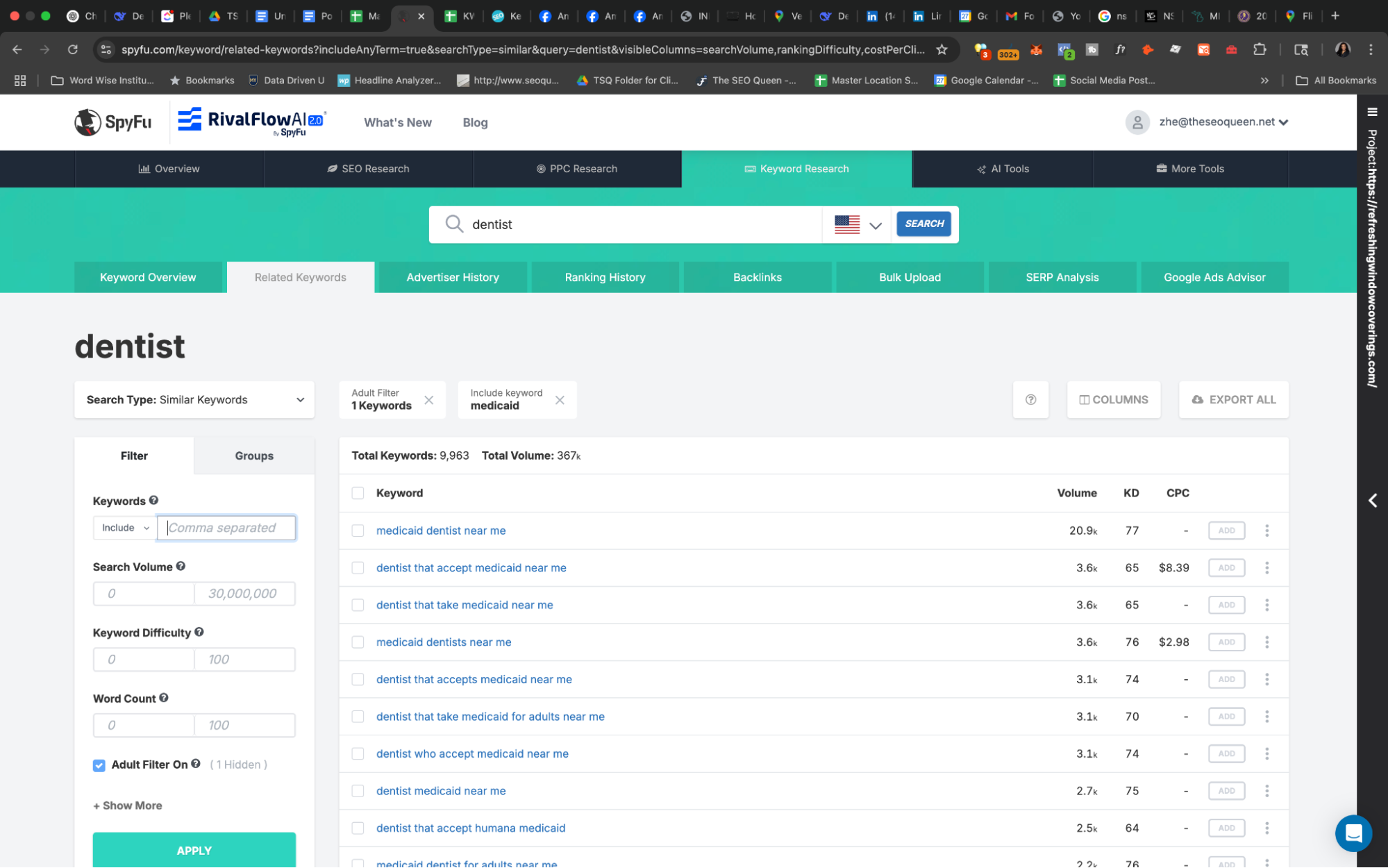
– Game-Changing Feature: Enter just 1 seed keyword (e.g., “dentist”), and SpyFu shows you:
All related keywords (e.g., “Medicaid dentist near me,” “pediatric dentist,” “cosmetic dentist NYC”)
Search volume & difficulty
Competitor ads (see what’s working for others)
There is also a search
Example: “Dentist” in SpyFu Reveals Thousands of Variations
(SpyFu Screenshot showing keyword variations like “Medicaid dentist near me,” “emergency dentist open now,” etc.)
Why This Matters:
You can own your niche by creating content for every relevant keyword to your products and services
This is The Quantum SEO Method—treating keywords like an economy to dominate.
2. 🗺️ Google Keyword Planner (Free with Google Ads)
Best for: Finding search volume & competition levels
Pro Tip: Use it to find geo-modified keywords (e.g., “dentist Atlanta” vs. “dentist”).
3. 🔮 AnswerThePublic (Free/Paid)
Best for: Question-based keywords
Example: Type “dental implants” → Get “are dental implants worth it,” “how long do dental implants last,” etc.
Having content that answers questions in your unique way sends Google the signal that your business is legit and will award you with more traffic. It is very important to invest in creating content that answers questions.
4. 📌 Google’s “People Also Ask” (Free Goldmine!)
How it works:
Google a keyword (e.g., “Medicaid dentist”).
Scroll to “People Also Ask”—these are real user questions you can target.
Step 3: Target These 6 High-Intent Keyword Types
Not all keywords are equal. Focus on these high-converting types:
1. Question Keywords (“How,” “What,” “Why”)
Example: “How to find a dentist that accepts Medicaid”
Why? Perfect for blog posts & FAQs, and this is also phenomenal for voice search visibility.
2. Geo-Targeted Keywords (City/State + Service)
Example: “Emergency dentist Miami”
Why? Local searches convert 5X higher.
3. “Near Me” Keywords (Hyper-Local Intent)
Example: “Dentist open Saturday near me”
Why? Mobile users search this way—optimize for GBP.
4. “Affordable” Keywords (Budget Buyers)
Example: “Affordable dental implants near me”
Why? Attracts price-sensitive shoppers.
5. “Best” Keywords (Comparison Shoppers)
Example: “Best pediatric dentist in Chicago”
Why? These searchers are ready to choose.
6. “For Sale” Keywords (Buyer Intent)
Example: “Invisalign for sale Houston”
Why? These searchers are ready to purchase.
Step 4: The Quantum SEO Method (Dominate Your Niche)
Most businesses only target a few keywords. The Quantum SEO Method flips this:
Find EVERY relevant keyword (using SpyFu, Google Planner, etc.)
Group them by intent (informational, commercial, transactional)
Create content for each cluster (blogs, service pages, FAQs)
Interlink strategically (build topical authority)
Example: Dentist Using Quantum SEO
Keyword Cluster
Content Type
Example Keywords
Medicaid Dentist
Service Page
“Medicaid dentist near me,” “does Medicaid cover root canals”
“cost of dental implants,” “are implants worth it”
Result: You own the entire keyword economy for your niche.
Step 5: Prioritize Keywords Like a Pro
Use this 3-factor system to choose winning keywords:
✅ Search Volume (100+ monthly searches)
✅ Low-Medium Competition (Easier to rank)
✅ High Intent (Transactional > Commercial > Informational)
Example: “Dentist” vs. “Emergency Dentist Open Now”
Keyword
Volume
Competition
Intent
Priority
“Dentist”
300,000
High
Informational
Low
“Emergency dentist open now”
12,000
Medium
Transactional
High
Winner: “Emergency dentist open now”—lower competition, ready-to-call customers.
Pro Tip: Update this monthly—SEO is a living strategy.
Final Thoughts: Stop Guessing, Start Dominating
Keyword research isn’t just about finding a few terms, it’s about owning your entire niche. When you go after the long tailed keywords and questions first make sure that they include your one or two word phrase from school. When you create long tailed content you are getting more of your website pages indexed by Google. Once you finish building the pages with the long tailed keywords and you get indexed, and then you ascend to Google Page 1, all of this trust and expertise established on your blog will help to catapult your business to stay consistent and ascend to Google Page 1 With The Quantum SEO Method, you can:
✔️ Discover thousands of untapped keywords (questions, geo-terms, “near me”)
✔️ Create content that dominates search results
✔️ Turn your website into a lead-generating machine
✔️ Destroy the myth that less is more for your website. The reality for a website is that more is more.
Previous PostThe Ultimate Guide to SEO Keyword Research: How to Find Easy Wins & High-Converting Money Terms
Next PostWhat Are SEO Keywords? (And Why They’re the Foundation of Every Page You Publish)
Author Zhe L. Scott
Zhe L. Scott, is the THE SEO QUEEN. She is passionate about motherhood, music and marketing. She is the author of SEO Training 2017: Search Engine Optimization and Marketing for Small Business. She loves to play the violin, write music. In her free time she loves to spend time with family and friends.